AI AutomationNo. 31
How to build an agentic OS for a small business: the order I'd build it in
I built the agentic operating system my business runs on, starting on 12 September 2026. These are the seven steps in the order I'd take them again, with what each one cost me when I got the order wrong.

The short answer
- Build an agentic OS in this order: memory, approval gate, one agent, a board, models with backups, a run log, then the next agent.
- My own system went from nothing on 12 September 2026 to a working board on 16 September, and 15 agents by mid-October.
- Put the approval gate in before the first agent can send anything. Once nothing can leave without a decision, you can let agents do the rest.
- Add the next agent only when the log shows the first one works. A system you can't see failing will fail where you can't see it.
Want this built and running in your business? See AI automation
How to build an agentic OS for a small business comes down to order: write the business down, put an approval gate in, add one agent for one job, give the work a board, choose models with backups, log every run, and only then add the next agent. That is the order I would take if I started my own system again tomorrow.
I started building Devian OS, the agentic operating system my business runs on, on 12 September 2026. Four days later agents were taking work from a board. Five weeks later it has 15 agents and 1,346 logged runs. Some of these steps I did in the right order and some I learned the hard way. If you would rather have one built for you, book a call and we can size it to your week.
What is an agentic OS, in one paragraph?
An agentic OS, or agentic operating system, is one place where AI agents take work, use only the tools they are allowed, share one memory, and stop for a decision before anything leaves. It replaces a pile of chat windows with a person copying between them. The AI operating system guide explains each part. This post is about how to build an agentic OS in the right order, which matters more than which tools you pick.
The seven steps
- Write the business down before any agent exists.
- Build the approval gate before the first agent can send anything.
- Hire one agent for one job, with only the tools that job needs.
- Put the work on a board, not in a chat.
- Choose a model for each role, and give it a backup.
- Log every run, and read the failures every week.
- Add the next agent only when the log says the first one works.
Step 1: Write the business down first
An agent is only as good as what it knows about you. Before you connect a single model, write your offer, your prices, your customers and your tone into a few plain notes. One short note should say whose business this is and what must never be done. My agents read that one on every run.
I keep this memory as an Obsidian vault, a folder of Markdown files any agent can read. How it is organised and how agents find the right note is in Obsidian as memory for AI agents.
Step 2: Build the approval gate before anything can leave
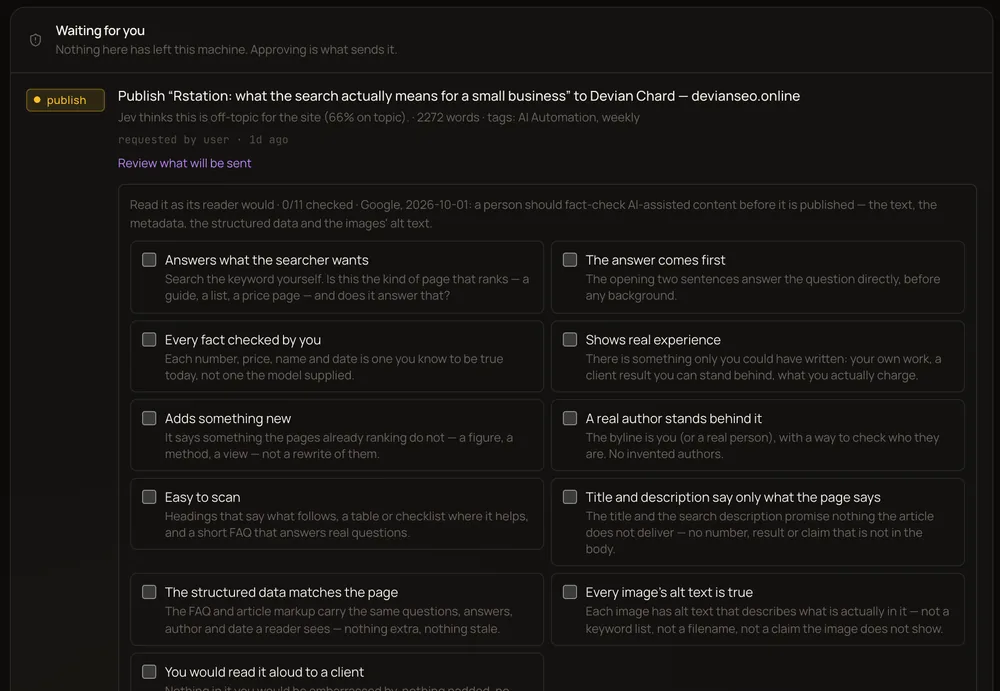
This is the step that makes every other step safe. Anything that leaves the system, a sent email, a published post, a payment, stops and waits for a decision. Once that is true, you can let agents research, draft and prepare everything else without worrying.
Since 13 September my gate has handled 42 requests. I decided 21 myself. 14 were articles approved by a standing rule I set, which approves an article only when it clears every automatic check, and holds it for me when it doesn’t. 4 expired and 3 are waiting for me now. The rule is mine to switch off. The point is that every outbound action goes through the gate, and every decision is recorded with who or what made it. There is more on how to set one up in human in the loop: deploying AI agents without losing control.
Step 3: Hire one agent for one job
Pick the job that is frequent, rule-based and low-risk: sorting enquiries, drafting replies for you to check, pulling a weekly report. Give the agent a role, not just a model, and only the tools that role needs. A researcher needs search. It does not need to send email.
Hire by role, not by model. Anthropic’s engineers make the same case in building effective agents: start with the simplest setup that works. Models change almost every month. A role with a clear job and clear permissions survives every one of those changes. To find the right first job, log a normal week first; the method is in the AI time audit.
Step 4: Put the work on a board
A chat is a bad place to keep work. It closes, it forgets, and it depends on you keeping it open. On a board, each job is a card: an agent picks it up, does it, and hands it back for review. You can see what is waiting, what is running and what failed.
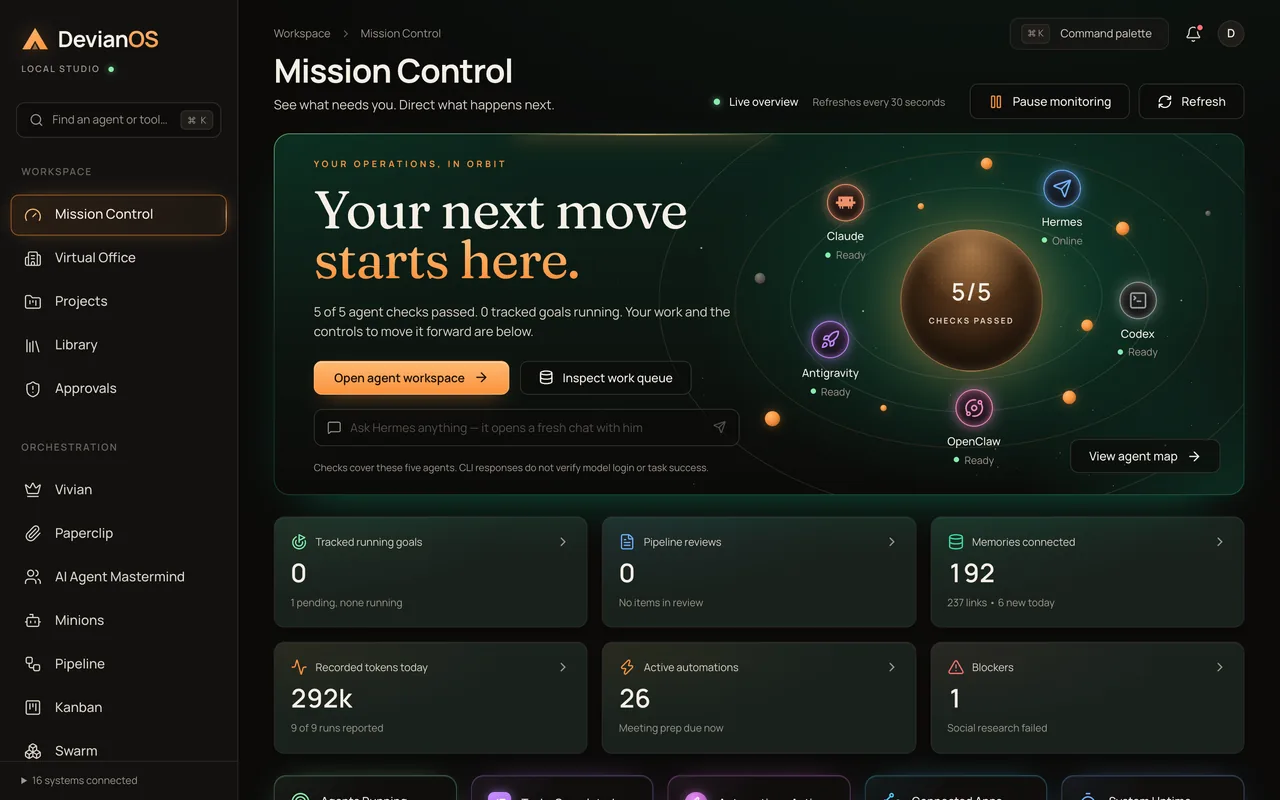
My board was the first thing I got working: agents were taking cards from it four days after I started. Mission Control, which shows what is running and what needs me, is where my day starts now.
Step 5: Choose a model for each role, with a backup
Different jobs need different models. A conversation needs a fast one. Writing needs one that doesn’t overthink. Work with tools needs one that supports tools. Changing the model behind a role should be a setting, not a rebuild.
Give each one a backup. More than half my runs go through free models, and free models get busy, run out of allowance and get renamed. What worked and what failed is in running AI agents on free models.
Step 6: Log every run, and read the failures
Every run in my system is recorded: which agent, which model, which notes it read, what it produced and whether it failed. 328 of my first 1,346 runs failed. That number stays in the log on purpose, sorted by cause, and I read it every week.
Judge each run by what it produced, not by whether it threw an error. My earliest runs could finish “successfully” with nothing to show for it. The full breakdown is in why AI agents fail.
Step 7: Add the next agent only when the first one works
It is tempting to add agents because they are easy to add. Resist it. Add the next role when the log shows the first one doing its job reliably, and when the week shows you the next job worth handing over.
I added agents faster than this in my first two weeks, and the busiest of those weeks had a 31% failure rate. Over the last 30 days, with fewer experiments and the fixes the log pointed to, it is about 20%.
How long does it take, and what does it cost?
My first working version, with a board and agents taking work, ran four days after I started. A small business does not need what I built. One agent, a memory, a board and the gate is a week or two of work, and that small version already changes how the week feels.
The software can cost very little. My agents run largely on free model routes and subscriptions I already pay for. The real cost is time: the building, and the weeks of reading the log.
If you would rather have it built, my AI automation projects start from $3,000 with a fixed quote after a free strategy session, and care plans start from $750 a month. Week one is an AI time audit, weeks two to five are the build, tested on real data and run in shadow mode, and from week six it rolls out with approvals in place. You own every automation.
What would I do differently?
Three things, all learned from the log:
- Count failures from day one. I added the rule that a run is judged by what it produced after I found runs that “succeeded” with nothing to show.
- Give every model a backup before you need one. One provider’s credits ran out mid-build and stopped a feature until it moved to a free model.
- Write the business note before the first agent. Everything an agent writes is better when it knows whose business it is working for.
The short version
Build an agentic OS in this order: memory, approval gate, one agent for one job, a board, models with backups, a run log, and only then the next agent. The gate makes it safe, the memory makes it useful, and the log tells you what to fix next.
If you want one sized to your business, book a call for a free 30-minute strategy session. The full method, with a 30-day build plan and a no-code track, is in my free book, The Agentic OS.
Frequently asked questions
How do you build an agentic OS?
In this order: write the business down as notes, build an approval gate, add one agent for one job with only the tools it needs, put work on a board, choose a model per role with a backup, log every run, then add the next agent.
How long does it take to build an agentic OS?
My first working version, with a board agents could take work from, was running four days after I started. A small business can have one useful agent with a memory and an approval gate in a week or two.
Do I need to code to build an agentic OS?
To build one from scratch, mostly yes, or you hire someone. To run a small one, no: the job is reviewing work and approving what leaves. My free book has a no-code track for each part.
What should an agentic OS do first?
One job that is frequent, rule-based and low-risk, such as sorting enquiries or drafting replies for you to check. Find it by logging a normal week before you build anything.
Questions people ask
How do you build an agentic OS?
How long does it take to build an agentic OS?
Do I need to code to build an agentic OS?
What should an agentic OS do first?
Written by
Devian Chard
AI automation and SEO consultant. I help founders and lean teams get found on Google, get cited in AI answers and hand their busywork to agents that ask before they act.